How to make and print nursery report cards
Updated 22 October 2026
A nursery report card is read by parents of very young children, so it should be warm, clear and short: how the child is doing in each learning area, how they are growing, and a few kind words. Here is what to put on it and how to print it well.
What a nursery report card shows
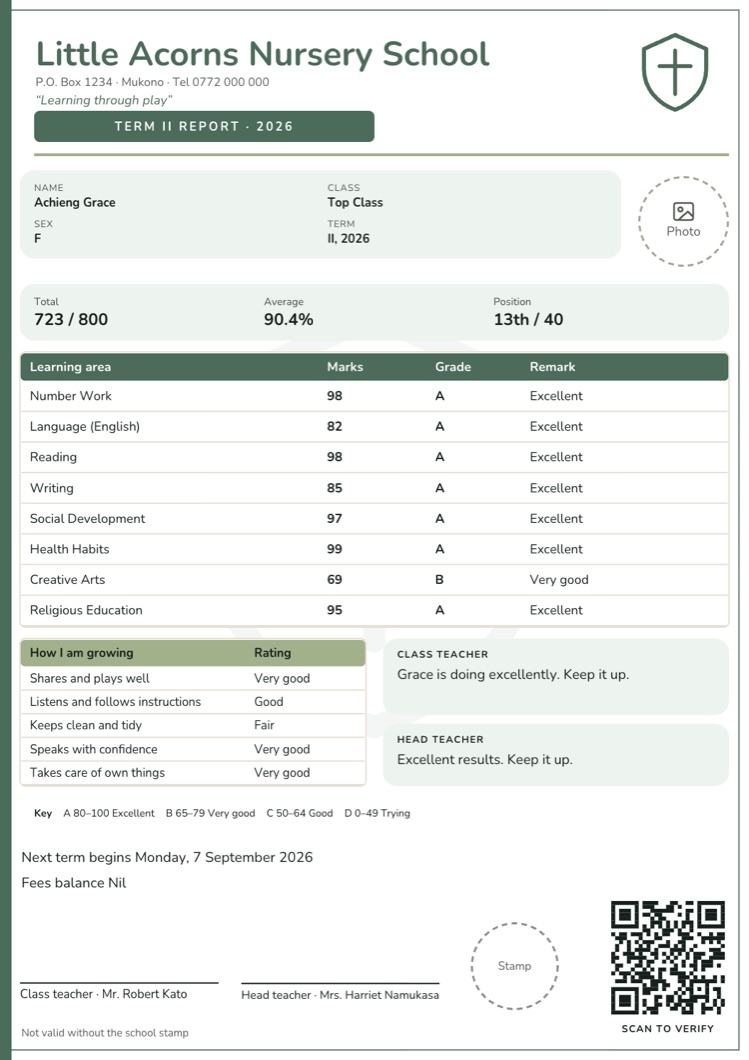
- The child’s details: name, class (Baby, Middle or Top class), term, and a photo if the parent has agreed to it.
- Learning areas with a mark or a grade and a short remark. Many schools use areas like Number Work, Language, Reading, Writing, Social Development, Health Habits, Creative Arts and Religious Education.
- How I am growing: skills rated in words, not numbers, such as “Shares and plays well”, “Listens and follows instructions”, “Keeps clean and tidy”, “Speaks with confidence” and “Holds a pencil well”, each marked Very good, Good, Fair or Needs help.
- Comments from the class teacher and the head teacher.
- Next term: when it begins, the fees balance and, if your school gives one, the requirements list.
Nursery cards usually leave out positions, aggregates and divisions. Ranking children of three to six years old helps nobody.
Grades for nursery
Most nursery schools use four simple grades. These are the ones Report Card Studio starts with; use your school’s own if they differ.
| Marks | Grade | Remark |
|---|---|---|
| 80–100 | A | Excellent |
| 65–79 | B | Very good |
| 50–64 | C | Good |
| 0–49 | D | Trying |
“Trying” says the same as “Fail” in a way a parent can hear. Some schools show only the grade and remark, with no marks at all.
Comments for little ones
[Name] is doing excellently. Keep it up.
[Name] is making good progress, and plays and shares well with friends.
[Name] is trying. Let us help with [Weakest subject] at home.
Use the child’s first name, say one thing that went well, and give parents one thing they can help with at home. More examples: report card comments for teachers →
Printing nursery cards well
- Print one card first on your own printer before the whole class, and check the edges, the photo and the small writing.
- If the edges are cut off, shrink the card a little (97%) rather than changing the design.
- Colour or black and white: soft colours look lovely, but if you print in black and white or photocopy, choose a design that stays clear in grey.
- Thicker paper holds up better in a small child’s bag.
- Photos only for children whose parents agreed, and small: a passport-size photo is enough.
Doing it in Report Card Studio
- Add your nursery classes, learning areas and children once in School setup (import the children from Excel).
- Pick one of 20 nursery designs, with learning areas, “How I am growing” and space for a photo, and make it your own.
- Teachers type marks in a Google Sheet on their phones; the class teacher picks each child’s skill ratings.
- Comments are written for every child from your own comment bank, and you can change any of them.
- Print one test card, then the whole class in one PDF.
Nursery cards without the late nights
Learning areas, growth ratings, photos with consent and a kind comment for every child, on your own design. Free until you print.